1–4%
Monthly Profit*
1–4%
Monthly Profit*
70:30
Profit Share*
No lock-in
Period
Weekly
Withdrawals
*Performance objective, not a guarantee. Investors keep 70% of profits; 30% is deducted every Saturday for company share and server costs. Capital is at risk.
MT5 read-only account
Live account details
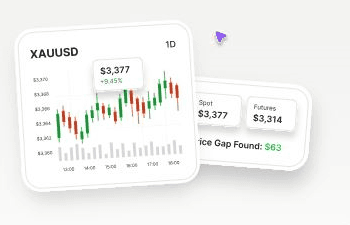
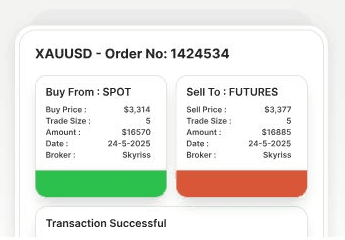
Arbitrage is the holy grail of trading — risk-free profit from market inefficiencies. Chopra Capital is built to detect and exploit gold price discrepancies between the Spot and Futures markets in real time. Gold trades in two places at once: the spot market and the futures market. Those two prices should be linked, but they drift apart for short windows. When they do, we buy the cheaper side and sell the higher side at the same time, then hold until the gap closes. It does this 24/7, with no fatigue, no emotions, and no room for human error. Backed by advanced algorithms and overseen by trading professionals.
Step 01
Create your Chopra Capital investor account.
Step 02
Submit your identity documents for approval.
Step 03
Choose an enabled deposit method and submit your request.
Step 04
Track your balance, profits, and account activity.
Step 05
Request a withdrawal during the weekly window.
You never install anything. You never touch MT5 unless you want to inspect the account.
Gaps close in fractions of a second. The system takes both legs faster than any human could click. If it can’t get both, it doesn’t take the trade.
The system trades on its own through every session. A trader monitors it, kills it in abnormal conditions, and can flatten the book manually. Automation without a human on the switch is how accounts blow up.
No. Chopra Capital manages the trading operation. You never install a bot or configure MT5. The read-only MT5 account is available only if you want to inspect the trading history.
No. It is a performance objective, not a guarantee. Some periods may be flat or negative, and capital can be lost.
There is no long-term lock-in period. Withdrawal requests follow the weekly window shown inside the investor portal.
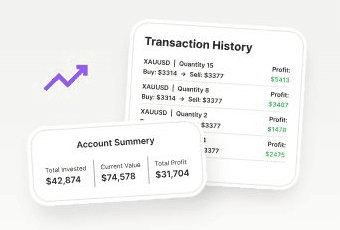
Your dashboard shows your balance, profits, queued funds, transactions, support tickets, and account activity.
Withdrawal requests are accepted during the weekly schedule shown in the investor portal and are processed after approval.
Get started
Open your account, complete verification, and review the process before adding funds. No trading software to install or configure. Capital remains at risk.